

Integrated Kitchen & POS Automation
Find the Right POS & Kitchen Display System Package
A seamless kitchen workflow starts with a Point of Sale built to power it. SalePoint evaluates your operational model to deliver a tailored POS solution with an integrated Kitchen Display System (KDS)—eliminating ticket chaos, speeding up prep times, and streamlining back-of-house communication.
Find Your POS & KDS Match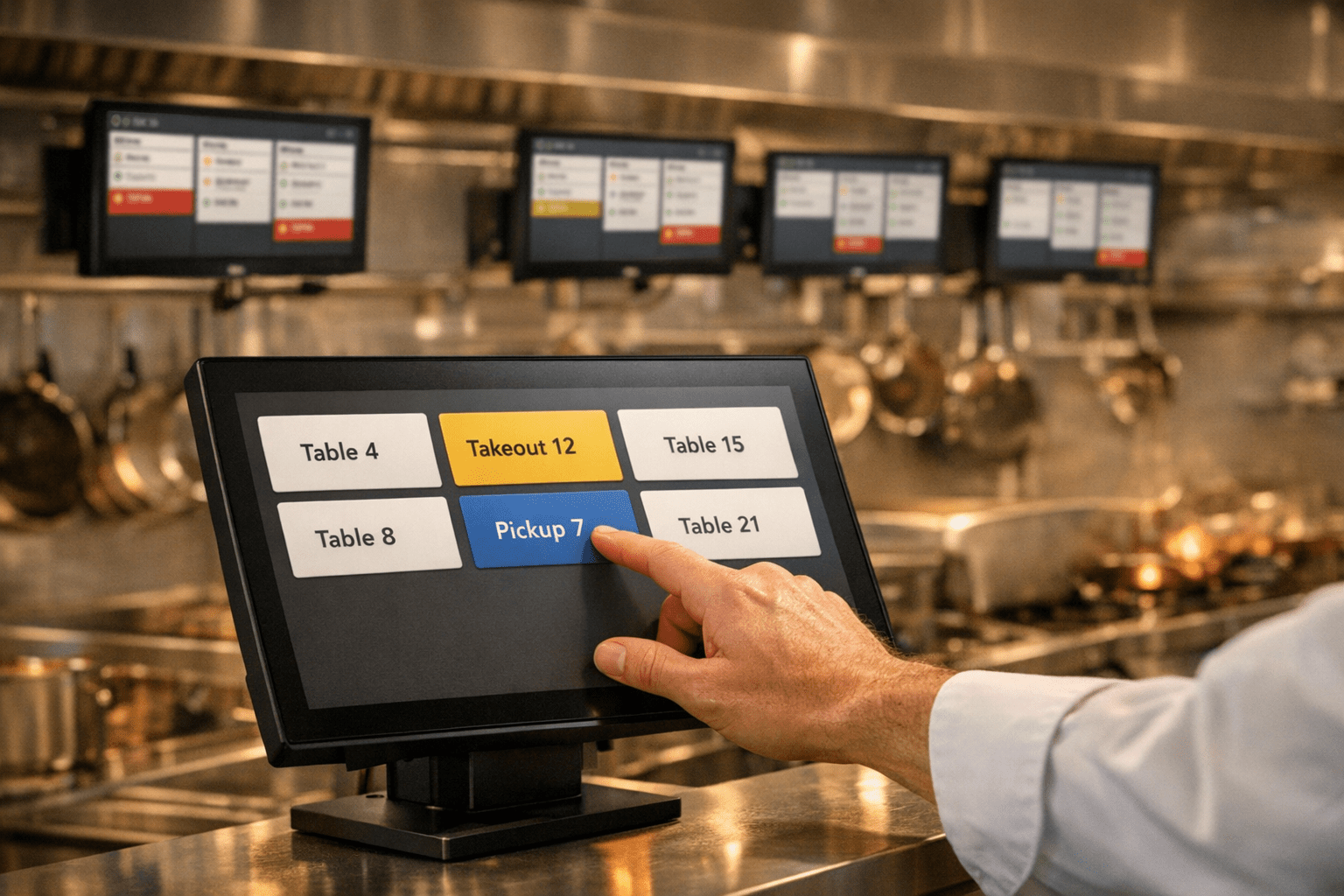
What Is an Integrated Kitchen Display System (KDS)?
An integrated Kitchen Display System (KDS) is a digital kitchen automation platform that links directly to your Point of Sale (POS) system, replacing paper tickets with real-time order routing. Orders placed at POS terminals, self-service kiosks, or online ordering apps appear instantly on station-specific displays, guiding line cooks with color-coded alerts and itemized prep lists. Because kitchen demands vary widely between fast-casual spots and full-service dining, SalePoint offers multiple POS systems with built-in KDS capabilities, helping operators choose the complete technology setup that best fits their workflow.
Benefits of an Integrated POS & Kitchen Display System
A purpose-built Kitchen Display System (KDS) paired with the right Point of Sale enables your kitchen to operate with greater speed, accuracy, and profitability. By replacing paper tickets with real-time digital automation, SalePoint helps operators configure a POS and KDS combination tailored to their specific menu and kitchen layout. Here are the core benefits restaurants achieve with an integrated solution.
- Instant Order Routing: Orders flow seamlessly from front-of-house POS terminals, self-service kiosks, and online channels straight to designated prep screens without printing delays or lost paper.
- Enhanced Prep Accuracy: Custom modifier layouts, allergy alerts, and station-specific routing ensure cooks prepare items correctly every time, drastically reducing costly remakes.
- Multi-Station Alignment: Synchronize prep, grill, fry, and expo stations with real-time ticket sync so complex orders finish simultaneously for fresh, hot delivery.
- Actionable Kitchen Analytics: Track ticket times, cook speed, and bottleneck stations across your POS platform to continuously refine back-of-house operations.
- Tailored POS Ecosystem Options: Because quick-service and full-service kitchens have vastly different needs, SalePoint offers multiple POS systems with native KDS support so you never overpay for features you don't need—or lack the ones you do.
- Reduced Operational Costs: Eliminate heat-sensitive paper and ribbon expenses while maximizing order throughput with existing line staff during peak service rushes.
Restaurant POS and Kitchen Display System Options for Efficient Order Management
Real-Time Kitchen Coordination Powered by the Right POS Platform
SalePoint pairs your restaurant with a Kitchen Display System (KDS) and POS package designed for your exact operational style—keeping every station in sync with clear, color-coded tracking from ticket entry to plating.
- Unified Order Visibility: Consolidate incoming tickets from front-of-house POS terminals, handheld devices, and online channels onto tailored display screens.
- Color-Coded Workflow Tracking: Monitor tickets through Preparing, Ready, and Completed stages to keep front-of-house and back-of-house teams aligned.
- Performance & Ticket Timers: Utilize built-in countdown metrics to highlight aging tickets, manage prep priorities, and accelerate average ticket completion times.
- Multi-Station Synchronization: Coordinate dedicated prep, grill, fry, and expo stations so complex items across different kitchen lines finish concurrently.
- Intuitive Kitchen Controls: Streamlined touch interfaces and bump bar options allow line cooks to navigate orders quickly without operational friction.
- Flexible POS Portfolio Integration: Choose from top-tier POS systems with native KDS functionality, ensuring your hardware and software fit your specific restaurant format and budget.

Integrated POS & Kitchen Display Systems for Seamless Order Management
An integrated Kitchen Display System (KDS) bridges the gap between your front and back of house by organizing tickets from your Point of Sale, online ordering, and self-ordering kiosks in one unified display. Because different restaurant concepts require tailored technology, SalePoint consults with you to implement the right POS solution featuring native KDS functionality—giving your team real-time status tracking, color-coded item progress, and streamlined back-of-house communication with zero paper confusion.


Comparing Kitchen Workflows: KDS vs. Paper Tickets vs. Hybrid Setups
Every kitchen operates differently depending on menu complexity, order volume, and staffing. SalePoint helps you evaluate your back-of-house needs and choose a Point of Sale system with integrated KDS capabilities that support your ideal workflow—whether fully digital, traditional paper, or a custom hybrid model.
Fully Digital KDS
- Instant Order Routing: Orders appear immediately from POS, kiosk, and online channels.
- Color-Coded Status: Track items through Preparing, Ready, and Completed stages.
- Real-Time Item Edits: Order modifiers, special instructions, and voids update instantly.
- Automated Line Routing: Send specific items directly to grill, fry, or salad stations.
- Ticket Timers & Alerts: Visual indicators prioritize aging orders to protect cook times.
- Zero Supply Costs: Completely eliminates expensive printer paper, ribbons, and maintenance.
Traditional Paper Tickets
- Printer Hardware Bottlenecks: Vulnerable to paper jams, low ink, or lost physical tickets.
- No Production Visibility: Requires verbal callouts between line cooks and expo.
- Manual Timing: Staff must guess ticket age without automated countdowns.
- Handwritten Modifications: Misread handwriting leads to order remakes and food waste.
- Sorting Errors: Physical tickets easily get misplaced, grease-stained, or dropped during rushes.
- Recurring Overhead: High ongoing expenses for specialized thermal or impact printer paper.
Hybrid POS Workflow
- Customized Station Deployment: Use KDS screens for fast-paced prep and paper prints at expo.
- Flexible Staff Transition: Eases kitchen teams into digital workflows at a comfortable pace.
- Partial Kitchen Automation: Gain KDS speed benefits at primary stations with paper backups.
- Strategic Redundancy: Maintains hard copies for specialized fulfillment or delivery packing.
- Tailored POS Integration: Configured by SalePoint to support your exact kitchen layout.
- Scalable Expansion: Add digital screens to remaining stations as your volume grows.
Essential KDS Features Configured for Your POS Setup
Advanced Item & Order Routing
Direct orders to dedicated stations based on preparation type—such as grill, fry, cold prep, or bar. SalePoint helps you configure automated station rules across your POS ecosystem so every item reaches the correct line instantly.
Digital Accuracy & Eco-Friendly Ticketing
Replace vulnerable kitchen printers with an eco-friendly digital display system. Eliminate missing, grease-stained, or unreadable paper tickets, ensuring line cooks prepare every custom order accurately.
Real-Time Performance Analytics
Gain actionable operational insights into prep times and station bottlenecks. Leverage built-in KDS analytics to optimize kitchen staffing, refine line workflows, and boost average ticket speed.
Display by Prep & Pacing Time
Pace multi-course meals and prioritize online pickups by displaying tickets based on prep times and scheduled collection windows. Reduce guest wait times and deliver consistently hot food to the table or bag.
Full & Partial Order Bumping
Provide kitchen and expo staff flexible control with full and item-level order bumping. Clear completed items while keeping in-progress dishes active, reducing screen clutter during heavy rushes.
Dedicated Expo Station Workflows
Keep food quality high with a centralized expediter screen layout. Coordinate courses, verify modifier accuracy, and ensure every plate leaves the kitchen together in correct sequence.
Our Commitment as Your POS & KDS Advisor
The right Point of Sale and Kitchen Display System only yields results when backed by dedicated, expert support. SalePoint's in-house advisors evaluate your operations to deliver the ideal POS-integrated KDS setup, then back it with knowledgeable 24/7/365 assistance to keep your screens online and your line running smoothly.
With customers nationwide and offices in Ohio, California, Arizona, and North Carolina, our team is always ready to guide you—whether you're implementing your first digital kitchen display or scaling across multiple locations.
Specializing in restaurant point of sale platforms, kitchen display integration, and back-of-house workflow optimization, we are committed to finding the right technology match for your staff and delivering a faster, more profitable kitchen operation.
Consultative Integrated Payment Solutions
SalePoint evaluates your processing needs to match your POS system with secure, EMV-compliant, and PCI-validated payment solutions tailored to your operational model.
Flexible Payment Acceptance: Support all major card brands, tap-to-pay, Apple Pay, Google Pay, and NFC contactless methods with end-to-end encryption and tokenization.
Built-in Security & Compliance: EMV chip technology and PCI-compliant processing safeguard customer data and minimize fraud liability across all payment terminals.
Seamless POS Integration: Direct communication between payment terminals and your POS eliminates manual entry errors, speeds up checkout lanes, and simplifies daily reconciliation.
Tailored Merchant Programs: SalePoint helps you navigate pricing structures—including interchange-plus, compliant surcharging, or dual pricing cash discount models—to maximize profitability.
Integrated POS & Kitchen Display System (KDS) – Frequently Asked Questions
A Kitchen Display System (KDS) replaces traditional paper tickets with real-time digital screens that organize, route, and track orders across kitchen stations. Directly connected to your Point of Sale, a KDS provides instant visibility into order status, ticket timing, and line workload.
SalePoint provides complete restaurant POS solutions featuring native, fully integrated KDS capabilities. Rather than trying to force a standalone display onto incompatible software, our consultants evaluate your operations and match you with the right POS system that includes the exact KDS features your kitchen requires.
An integrated setup eliminates manual ticket handoffs and printer jams. Orders entered at front-of-house terminals or handhelds route immediately to the proper prep station, reducing ticket turnaround times and keeping front and back-of-house staff synchronized during peak rushes.
Yes. Digital screens display clean item modifiers, allergy alerts, and special instructions clearly—eliminating misread handwriting and lost paper receipts so line cooks prepare every order right the first time.
Yes. POS-integrated KDS solutions track real-time operational data like average ticket completion times, individual station bottlenecks, and delayed orders—giving management actionable reports to optimize staffing and kitchen workflow.
Absolutely. You can deploy dedicated screens for grill, fry, salad, dessert, or expo stations. SalePoint configures station-specific routing rules across your POS platform so items are directed only to the staff preparing them.
Orders placed via online ordering, third-party delivery apps, or self-ordering kiosks flow directly onto the KDS screens alongside dine-in tickets—eliminating tablet clutter and manual order re-entry.
Yes. When connected to your restaurant's secure local network or Wi-Fi, wireless KDS hardware operates reliably across prep stations without the clutter of network cables.
Ready to Find the Right POS & Kitchen Display System for Your Restaurant?
Speak with a SalePoint advisor to explore integrated kitchen display options tailored to your specific workflow.
Request a Free Consultation & Demo