

Restaurant Point of Sale
The Right Restaurant POS for Your Operation
We don't believe in one-size-fits-all POS systems. SalePoint evaluates your workflow to match you with the ideal technology, integrated payments, and ongoing support built for the way you actually operate.
Talk to a POS Expert
What Is a Restaurant POS System?
A restaurant POS system is the core operational engine that manages orders, payment processing, menus, and front-to-back-of-house workflows. Modern POS platforms connect order entry terminals, Kitchen Display Systems (KDS), online ordering, and reporting into a single real-time environment. However, because no two restaurant operations run the exact same way, the best restaurant POS isn't a one-size-fits-all product—it’s the technology that fits your specific service model, menu complexity, and budget.
SalePoint helps restaurant operators evaluate their business requirements to select, implement, and support the right POS technology—combining hardware, software, integrated payments, and 24/7 dedicated support under one accountable partner.
Benefits of Partnering with SalePoint for Your Restaurant POS
The right restaurant POS system helps your team work faster, reduce errors, and deliver an exceptional guest experience. By evaluating your operation and matching you with the ideal technology and integrated payments, SalePoint helps you solve real operational challenges without locking you into a one-size-fits-all platform.
- Tailored Technology Choice: Get the exact hardware and software that fits your service model instead of compromising with a rigid system.
- Faster Service & Order Accuracy: Move lines quickly and eliminate ticket errors with intuitive workflows and smart modifier logic tailored to your menu.
- Transparent Payment Processing: Eliminate escalating processing fees and locked ecosystems with integrated payments and flexible rate options.
- Higher Revenue & Table Turns: Increase ticket sizes with built-in upsell prompts and speed up guest checkouts with pay-at-the-table solutions.
- Real-Time Multi-Location Insights: Track sales, labor, menu performance, and inventory across all your store locations from one dashboard.
- One Accountable Partner: Stop calling multiple vendors—SalePoint manages evaluation, deployment, training, and 24/7 ongoing support.
Your Complete Restaurant Transaction Ecosystem
SalePoint connects every layer of your restaurant operation into a seamless transaction ecosystem. From online ordering and kitchen routing to integrated payments and multi-location analytics, we match your business with the right technology options—giving you full control without rigid platform lock-in.
Zero-Commission Online Ordering
Sync web, mobile, and third-party delivery orders directly into your POS with automated kitchen routing and real-time menu management. Keep your profits instead of paying high marketplace commissions.
Explore Online Ordering →Kitchen Display Systems (KDS)
Replace paper tickets with real-time digital kitchen displays. Organize complex modifiers, track prep times, and synchronize front- and back-of-house operations during rush hours.
View Kitchen Display Systems →QSR & Fast Casual Workflows
Speed up service and eliminate server bottlenecks with line-busting tools, fast modifier logic, combo building, and optional self-ordering kiosks.
See QSR Solutions →Integrated Payments & Settlement
Eliminate high, locked-in credit card processing fees. Protect your margins with integrated EMV payments, pay-at-the-table speed, and transparent processing setups.
Explore Payment Solutions →Reporting & Analytics
Gain full visibility over your operation with real-time tracking for sales, product mix, labor costs, and profitability through customizable cloud dashboards.
Explore Reporting & Analytics →Multi-Location & Single-Source Support
Centralize menu updates and compare location trends across all your stores—backed by 24/7 dedicated support from one accountable technology partner.
View Multi-Location Insights →Why SalePoint?
We don't believe in forcing every restaurant into one platform. SalePoint combines independent technology evaluation with integrated payments, hardware, and 24/7 accountable support—giving you the exact POS solution built for the way you operate.
Choice & Flexibility
Multiple POS options tailored to your service model—never locked into a single rigid ecosystem.
One Accountable Partner
Stop juggling vendors. We manage evaluation, deployment, hardware, payments, and 24/7 dedicated support.
Transparent Processing
Integrated payment solutions designed to protect your margins and eliminate escalating locked-in fees.
Tailored Workflows
Configure fast order entry, complex modifiers, kitchen routing, and reporting for your exact menu.
Decades of Expertise
35+ years of trusted technology advisory, helping restaurants choose and implement the right POS.
Scalable Growth
Purpose-built options that expand effortlessly from single-location concepts to multi-unit brands.
Restaurant POS Modifier Management for Pizza and Customizable Menu Items
Faster, smarter modifier workflows for complex restaurant menus
Modifier mistakes slow down service and frustrate guests. SalePoint configures restaurant POS solutions with intelligent modifier logic tailored to your exact operational requirements—improving order accuracy, boosting ticket sizes, and keeping kitchen tickets clear.
- Streamlined Modifier Selection: Speed up order entry and eliminate server bottlenecks with interconnected modifier logic.
- Pizza Matrix & Split Tops: Easily handle complex 1/2 and 1/2 topping configurations, crust types, and specialty builds without kitchen confusion.
- Intelligent Upselling Prompts: Guide staff to offer premium toppings, add-ons, and combos to increase average check size.
- Automated Dynamic Pricing: Automatically adjust pricing based on selected sizes, substitutions, or modifier depth.
- Centralized Cloud Menu Control: Update pricing, seasonal modifiers, and item availability instantly across one or multiple store locations.
- Real-Time Stock & Recipe Tracking: Track ingredient usage, recipe costs, and item countdowns directly through integrated inventory management.
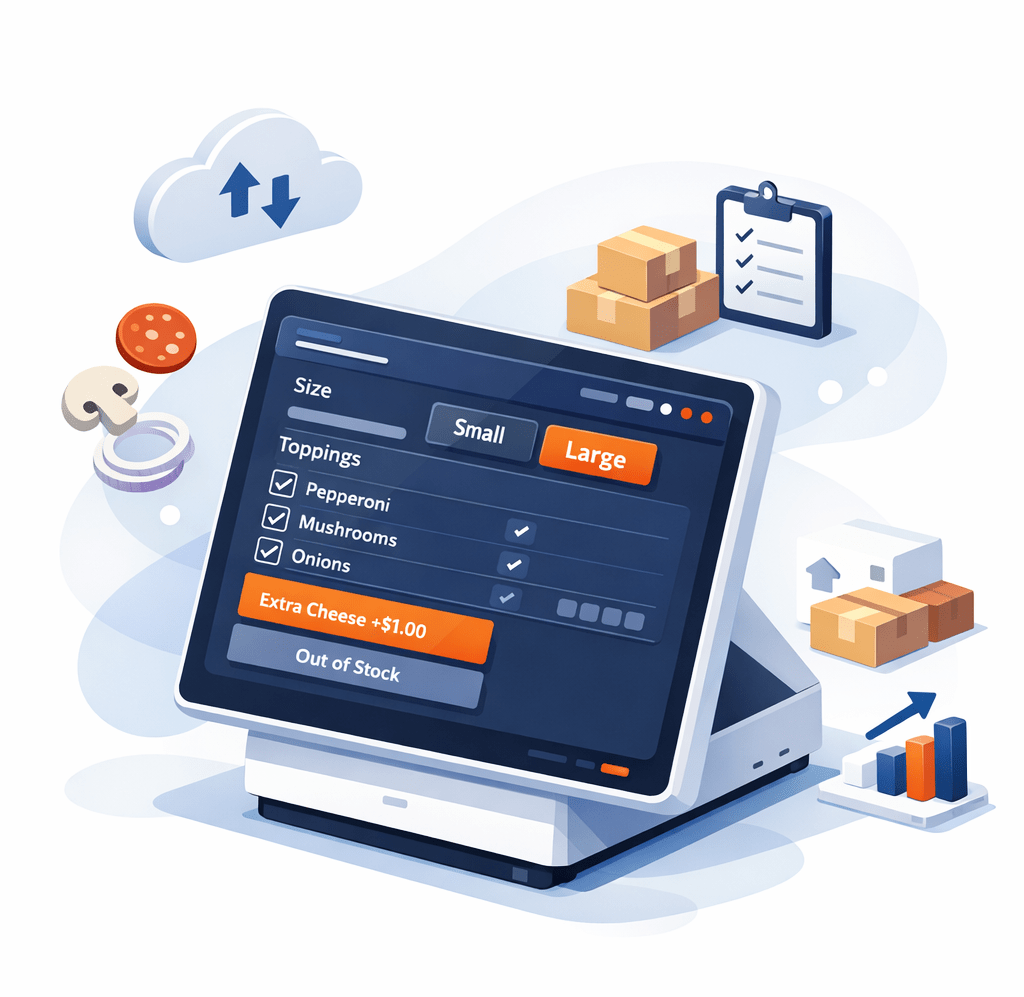
Reliable Restaurant Technology Built Around Your Operation
The right restaurant POS system should simplify your daily operations, not complicate them. SalePoint evaluates your workflow to deliver fast order entry, instant kitchen display routing, and integrated payment processing—backed by 24/7 dedicated support from one accountable partner. Instead of forcing your business into a single rigid platform, we provide reliable technology choices designed to keep your lines moving and your guests happy.


Restaurant POS Operations for Full Service, Quick Service, Drive-Thru, and Self-Service Restaurants
Optimized operations built around your restaurant's unique service model
There isn't one best restaurant POS—there’s a best POS for your operation. SalePoint evaluates your specific service flow to deliver restaurant POS solutions that streamline front- and back-of-house operations across full service, QSR, drive-thru, and self-service environments.
- Full-Service Flexibility: Split checks by seat or item, manage tableside handheld ordering, and speed up checkouts with pay-at-the-table terminals.
- Rapid QSR & Counter Service: Speed up line-busting with simplified menu layouts, automated combo pricing, and instant order routing.
- Smart Kitchen Display Routing: Automatically direct items to specific prep stations with real-time KDS tickets to track ticket times and kitchen performance.
- High-Volume Drive-Thru: Support multi-lane order entry, order confirmation displays, and rapid window handoffs.
- Self-Service Kiosks: Reduce labor pressure and improve order accuracy with intuitive self-ordering kiosks designed to boost check sizes.
- Integrated Payments & Settlement: Process payments securely, perform post-authorization tip adjustments, and eliminate locked-in processing markups.
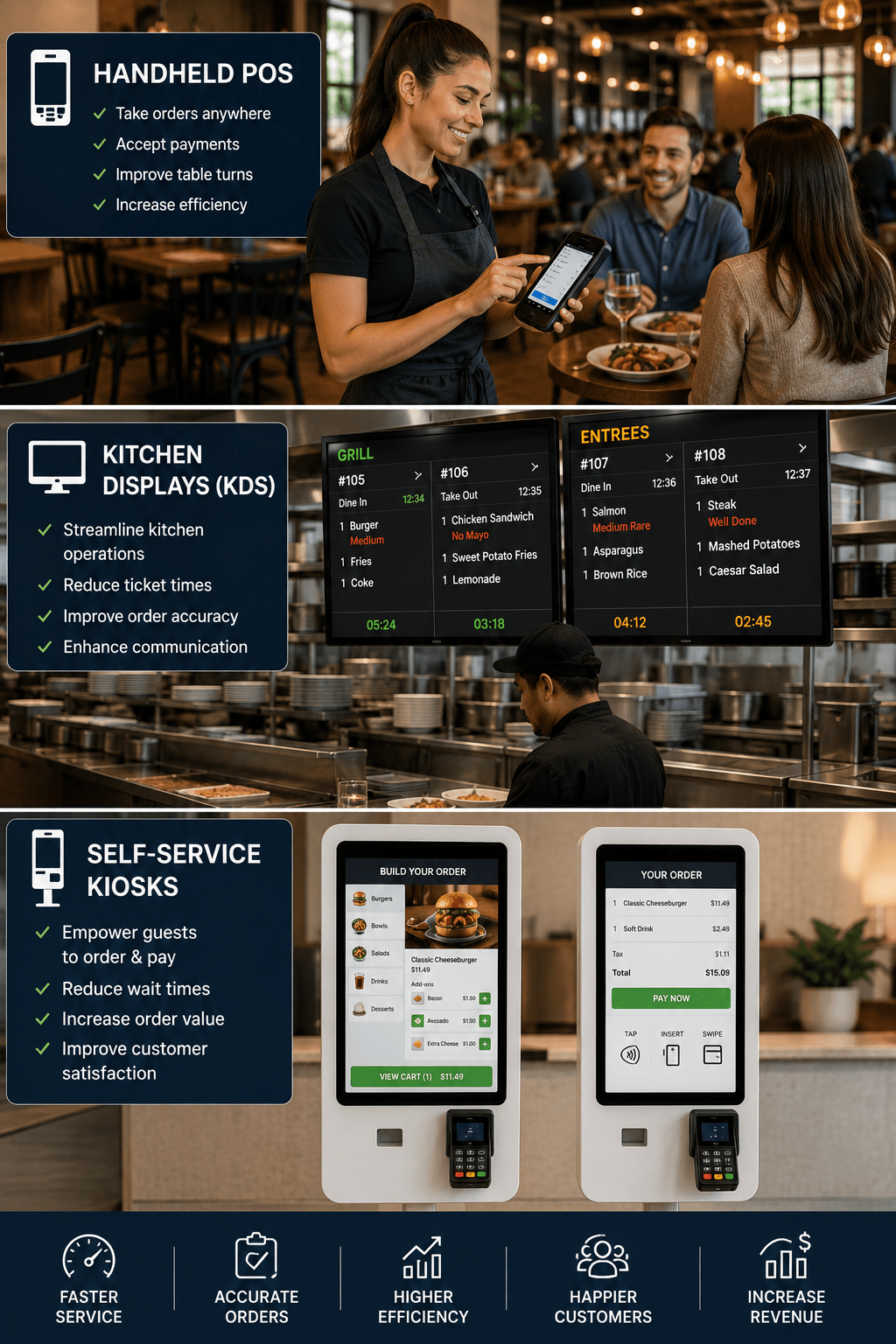
Essential Operational Capabilities Built Around Your Business
Enterprise Security & Access Controls
Protect your transaction environment with PIN and biometric authentication. Establish custom security permissions tied to job codes to control refunds, voids, discounts, and cash drawer management across all locations.
Unified Multi-Location Dashboard
Manage menus, pricing, and analytics from a centralized cloud dashboard. Maintain brand consistency while giving individual locations regional flexibility and scaling your footprint effortlessly.
Seamless Check & Item Splitting
Divide guest checks by seat, item, or group with zero server friction. Speed up table turns, eliminate billing errors during rush hours, and deliver a smooth guest checkout experience.
Automated Tip Pooling & Pay at Table
Automate fair tip distribution and post-authorization closeouts. Integrate handheld pay-at-the-table technology to increase server gratuities, speed up checkouts, and protect processing margins.
Pizza Matrix & Complex Modifiers
Customize complex orders through an intuitive half-and-half matrix and topping selector. Eliminate modifier mistakes, ensure accurate item pricing, and keep kitchen prep synchronized.
Real-Time Inventory & Recipe Control
Track ingredients, recipes, and stock counts in real time. Identify menu performance trends, cut food waste, and streamline purchasing across your entire operation.
A Strong Alternative to Toast, Square, and Clover
Restaurants searching for an alternative to rigid, single-product POS systems choose SalePoint. We evaluate your operation to deliver tailored platform choices, transparent payment processing, and fast workflows—all backed by 24/7 U.S.-based support from one accountable partner.
Tailored Hardware & Systems
Deploy handhelds, tablets, or enterprise terminals built for your workflow—without being locked into proprietary hardware ecosystems.
Transparent Processing
No surprise rate spikes, no forced processor lock-in, and transparent fee structures designed to protect your restaurant's bottom line.
Built-In Online Ordering
Commission-free online ordering fully integrated with your POS, kitchen routing, and menu management tools.
Mobile & Tableside POS
Serve tableside, curbside, or patio guests with fast mobile ordering, complex modifier logic, and EMV pay-at-the-table terminals.
24/7 Dedicated Support
Real U.S.-based support specialists available 24/7/365—a major reason operators switch to SalePoint from Toast, Square, and Clover.
Scalable Operational Choice
Instead of forcing every concept into one software model, SalePoint matches your business with the platform that actually fits.
Evaluating POS Architectures: Cloud, Legacy, & Hybrid
Choosing the right restaurant POS architecture comes down to your specific operational needs, menu complexity, and redundancy requirements. SalePoint helps operators evaluate pure cloud-based POS, traditional legacy systems, and resilient hybrid platforms to build the ideal technology stack.
Pure Cloud POS
- Real-Time Central Control: Update menus, pricing, and modifier logic instantly across all devices.
- Anywhere Management: Access sales performance, labor metrics, and reporting from any browser.
- Low On-Site Footprint: Eliminates heavy local server maintenance and expensive back-office hardware.
- Seamless Mobility: Powers tableside handheld ordering, pay-at-the-table, and self-service kiosks.
- Automatic Feature Delivery: Continuous updates and security patches deploy automatically.
Legacy On-Premise
- Local Server Reliance: Operations depend on physical back-office server hardware and maintenance.
- High Upfront Investment: Heavy initial capital expenditure for servers, software licenses, and setup.
- Manual Maintenance: Software upgrades and menu syncs often require manual intervention or technician visits.
- Tied to Fixed Terminals: Limited mobile capabilities and harder integration with modern online ordering.
- On-Site Reporting: Data and operational controls are restricted to the local network.
Resilient Hybrid POS
- Offline Failover Protection: Cloud convenience backed by local network resilience so payments and ordering never stop during internet drops.
- Enterprise Balance: Combines real-time cloud reporting with heavy-duty on-premise ticket handling.
- Flexible Deployment: Connect fixed terminals, handheld devices, and Kitchen Display Systems (KDS).
- Protected Revenue: Keeps order routing and card processing running smoothly during peak rush hours.
- Smooth Migration Path: Ideal for high-volume concepts transitioning away from legacy infrastructure.
Our Commitment to Restaurant Operators
Technology is only as good as the team standing behind it. SalePoint delivers a full-service technology partnership—evaluating your operation, implementing integrated payments, and providing 24/7/365 dedicated U.S.-based support.
- One Accountable Partner: Single-source management for software, hardware, payment processing, and IT so you never have to juggle multiple vendors.
- Nationwide Footprint: Real humans and expert teams supporting operators nationwide from offices in Ohio, California, Arizona, and North Carolina.
- Built for Growth: Comprehensive FOH and BOH workflows—from fast ordering and complex modifiers to zero-commission online ordering and real-time inventory control.
Integrated Payment Processing
Stop settling for expensive, locked payment ecosystems. SalePoint integrates secure, EMV-compliant processing directly into your restaurant POS—protecting your margins with transparent rates and single-source accountability.
- Flexible Processing Options: Choose from interchange-plus, dual pricing, surcharging, or custom programs tailored to your business model.
- Pay at the Table & Contactless: Support EMV chip, tap-to-pay, Apple Pay, and Google Pay to speed up checkout and boost server tips by up to 50%.
- End-to-End Security: Tokenized, PCI-compliant transaction processing eliminates manual entry errors and protects cardholder data.
Restaurant POS System – Frequently Asked Questions
Unlike single-product vendors that force you into a one-size-fits-all platform, SalePoint acts as an independent technology advisor. We evaluate your menu complexity, service style, and operational workflow to match you with the right restaurant POS solution.
SalePoint provides flexible, integrated payment processing with transparent pricing. We support interchange-plus, dual pricing, surcharging, pay-at-the-table, EMV chip, and contactless mobile wallets without locking you into expensive, forced processor rates.
Yes. SalePoint solutions feature offline resilience, allowing your staff to continue taking orders, processing credit card transactions, and routing tickets to the kitchen even when your internet connection goes down.
SalePoint provides single-source accountability with dedicated 24/7/365 U.S.-based support. We manage evaluation, installation, hardware, payment processing, and ongoing service so you never have to juggle multiple vendors.
Yes. Our centralized cloud management tools allow multi-unit operators to sync menus, pricing, and modifier changes instantly while tracking sales, labor, and inventory performance across all locations from a single dashboard.
Yes. SalePoint configures solutions for full-service dining (split checks, tableside handhelds, pay-at-the-table), quick-service counter environments (line-busting, combo meal matrices, self-service kiosks), drive-thrus, and zero-commission online ordering.
Ready to Find the Right POS System for Your Restaurant?
Stop settling for forced payment rates and one-size-fits-all technology. Talk with a SalePoint expert to evaluate your operation, compare platforms, and get a tailored solution built for the way you run your business.